
绘制道路线
关键引入文件:
- 第一步:引入框架地图关键文件
- https://mhc.ixiera.com/mhc/main_min.js
- https://mhc.ixiera.com/mhc/Cesium-1.120/Build/Cesium/Cesium.js
- https://mhc.ixiera.com/mhc/Cesium3DTile.js
- 第二步:引入道路标线绘制文件
- https://mhc.ixiera.com/mhc/mchmap/RoadRenderer/js/RoadRenderer.min.js
1. 初始化
renderer = new RoadRenderer(viewer);
2. 参数说明:
一、构造函数参数。
| 参数 | 数据类型 | 是否必填 | 说明 |
| viewer | Object | 必填 | Cesium Viewer 实例 |
二、draw 方法配置参数。
| 参数 | 数据类型 | 是否必填 | 默认值 | 说明 |
| positions | Array | 必填 | - | 道路中心线经纬度坐标数组 [[lon, lat], ...] |
| laneCount | number | 选填 | 4 | 总车道数 |
| twoWay | boolean | 选填 | true | 是否双向道路 |
| smooth | boolean | 选填 | true | 是否对中心线进行贝塞尔平滑 |
| smoothResolution | number | 选填 | 15000 | 平滑插值精度,值越大越精细 |
| smoothSharpness | number | 选填 | 0.4 | 平滑度,0~1,值越大越锐利 |
| colors.yellow | string/Cesium.Color | 选填 | '#DAA520' | 双黄线颜色 |
| colors.white | string/Cesium.Color | 选填 | '#FFFFFF' | 车道虚线颜色 |
| colors.edge | string/Cesium.Color | 选填 | '#FFFFFF' | 边缘实线颜色 |
| widths.yellow | number | 选填 | 3.5 | 双黄线宽度(像素) |
| widths.dash | number | 选填 | 2 | 虚线宽度(像素) |
| widths.edge | number | 选填 | 2 | 边缘线宽度(像素) |
| offsets.yellow | number | 选填 | 2 | 双黄线间距的一半(单位:米) |
| offsets.laneGap | number | 选填 | 3 | 相邻车道间距(单位:米) |
三、API 方法
| 方法名 | 参数 | 返回值 | 说明 |
| draw(config) | Object | RoadRenderer | 绘制道路标线 |
| updateRoad(positions, options) | Array, Object | RoadRenderer | 清空旧路并绘制新路(自动合并配置) |
| startInteractiveDraw(onComplete, options) | Function, Object | RoadRenderer | 启动交互绘制模式(左键加点,右键结束) |
| cancelInteractiveDraw() | 无 | RoadRenderer | 取消交互绘制(不生成道路) |
| isDrawing() | 无 | boolean | 返回当前是否在交互绘制模式 |
| show() | 无 | RoadRenderer | 显示道路并飞向道路区域 |
| hide() | 无 | RoadRenderer | 隐藏道路 |
| toggle() | 无 | RoadRenderer | 切换显示/隐藏 |
| isShown() | 无 | boolean | 返回当前可见状态 |
| clear() | 无 | RoadRenderer | 清除所有道路实体 |
| getEntityCount() | 无 | number | 获取实体数量 |
| destroy() | 无 | void | 销毁实例,清理资源 |
4. 使用示例
4.1 基础绘制
// 定义道路中心线
const positions = [
[116.3900, 39.9090],
[116.3910, 39.9100],
[116.3915, 39.9110],
[116.3920, 39.9120]
];
// 绘制双向四车道
renderer.draw({
positions: positions,
laneCount: 4,
twoWay: true,
smooth: true
});
4.2 自定义样式
renderer.draw({
positions: positions,
laneCount: 6,
twoWay: true,
colors: {
yellow: '#FF6600',
white: '#E0E0E0',
edge: '#FFFFFF'
},
widths: {
yellow: 5,
dash: 2.5,
edge: 3
},
offsets: {
yellow: 2.5,
laneGap: 3.5
}
});
4.3 交互绘制
// 启动交互绘制(左键加点,右键结束)
renderer.startInteractiveDraw(
(points) => {
// 绘制完成回调
console.log('道路生成完成,共 ' + points.length + ' 个点');
},
{
laneCount: 4,
twoWay: true,
smooth: true
}
);
// 取消交互绘制
renderer.cancelInteractiveDraw();
4.4 显示控制
// 显示并飞向道路
renderer.show({
pitch: Cesium.Math.toRadians(-55),
duration: 1.5
});
// 隐藏
renderer.hide();
// 切换显示/隐藏
renderer.toggle();
// 获取可见状态
const isVisible = renderer.isShown();
4.5 更新道路
const newPositions = [
[116.3900, 39.9080],
[116.3910, 39.9090],
[116.3920, 39.9100]
];
// 清空旧路并绘制新路(自动继承上次配置)
renderer.updateRoad(newPositions, {
laneCount: 6
});
4.6 清除与销毁
// 清除所有道路
renderer.clear();
// 销毁实例
renderer.destroy();
5. 完整代码实例
<!DOCTYPE html>
<html lang="zh-CN">
<head>
<meta charset="UTF-8">
<meta name="viewport" content="width=device-width, initial-scale=1.0">
<title>道路标线绘制示例</title>
<script src="https://mhc.ixiera.com/mhc/main.js"></script>
<script src="https://mhc.ixiera.com/mhc/Cesium-1.120/Build/Cesium/Cesium.js"></script>
<script src="https://mhc.ixiera.com/mhc/Cesium3DTile.js"></script>
<script src="js/RoadRenderer.js"></script>
<style>
html,body,#cesiumContainer { width: 100%;height: 100%;margin: 0;padding: 0;overflow: hidden;}
.btnsBox { position: fixed;top: 10px;left: 10px;z-index: 1000;display: flex;gap: 10px;flex-wrap: wrap;}
.btnsBox button { background-color: #fff;border-radius: 4px;color: #333;line-height: 32px;font-size: 13px;padding: 0 16px;cursor: pointer;border: 1px solid #ddd;}
.btnsBox button:hover { background-color: #f0f0f0; }
.btnsBox button.active-draw { background-color: #ff4444;color: white;border-color: #cc0000;}
</style>
</head>
<body>
<div id="cesiumContainer"></div>
<div class="btnsBox">
<button id="btnDrawInteractive" onclick="toggleDraw()"> 交互绘制</button>
<button onclick="btnClear()">清除</button>
<button onclick="btnDraw4Lane()">双向四车道</button>
<button onclick="btnDraw6Lane()">双向六车道</button>
<button onclick="btnDrawOneWay()">单向三车道</button>
<button onclick="btnDrawCustom()">自定义样式</button>
<button onclick="btnShow()">显示并定位</button>
<button onclick="btnHide()">隐藏</button>
<button onclick="btnToggle()">切换显示</button>
<button onclick="getEntityCount()">获取实体数</button>
<button onclick="destroyRenderer()">销毁实例</button>
</div>
<script>
// 一、初始化Cesium
const view3D = MchCesium.init('cesiumContainer', true);
const viewer = MchCesium.viewer;
viewer.scene.globe.depthTestAgainstTerrain = false;
// 二、设置相机位置
viewer.camera.flyTo({
destination: Cesium.Cartesian3.fromDegrees(116.390, 39.911, 500),
orientation: { heading: 0, pitch: Cesium.Math.toRadians(-60), roll: 0 },
duration: 2
});
// 三、创建道路渲染器实例
let renderer = null;
function initRenderer() {
if (renderer) return;
renderer = new RoadRenderer(viewer);
btnDraw4Lane();
}
initRenderer();
// 四、交互绘制控制
function toggleDraw() {
if (!renderer) return;
if (renderer.isDrawing()) {
renderer.cancelInteractiveDraw();
document.getElementById('btnDrawInteractive').textContent = ' 交互绘制';
document.getElementById('btnDrawInteractive').classList.remove('active-draw');
} else {
renderer.startInteractiveDraw(() => {
console.log('绘制') //回调函数
}, { laneCount: 4, twoWay: true, smooth: true });
}
}
// 五、其他功能函数
function btnClear() { if (renderer) renderer.clear(); }
function btnDraw4Lane() {
if (!renderer) return;
renderer.clear();
renderer.draw({ positions: road1, laneCount: 4, twoWay: true, smooth: true });
}
function btnDraw6Lane() {
if (!renderer) return;
renderer.clear();
renderer.draw({ positions: road1, laneCount: 6, twoWay: true, smooth: true });
}
function btnDrawOneWay() {
if (!renderer) return;
renderer.clear();
renderer.draw({
positions: road2,
laneCount: 3,
twoWay: false,
smooth: true,
offsets: { yellow: 2, laneGap: 3.5 }
});
}
function btnDrawCustom() {
if (!renderer) return;
renderer.clear();
renderer.draw({
positions: road1,
laneCount: 4,
twoWay: true,
smooth: true,
colors: { yellow: '#FF6600', white: '#E0E0E0', edge: '#FFFFFF' },
widths: { yellow: 5, dash: 2.5, edge: 3 },
offsets: { yellow: 2.5, laneGap: 3.5 }
});
}
function btnShow() {
if (!renderer || !renderer.isRunning) return;
renderer.show({ pitch: Cesium.Math.toRadians(-55), duration: 1.5 });
}
function btnHide() {
if (renderer) renderer.hide();
}
function btnToggle() {
if (!renderer || !renderer.isRunning) return;
renderer.toggle({ pitch: Cesium.Math.toRadians(-55), duration: 1.5 });
}
function getEntityCount() {
if (renderer) {
const count = renderer.getEntityCount();
const visible = renderer.isShown();
if (typeof McrbHttpClient !== 'undefined') McrbHttpClient.popup.msg(`实体数: ${count}, 可见: ${visible ? '是' : '否'}`, { icon: 1 });
}
}
function destroyRenderer() {
if (renderer) {
renderer.destroy();
renderer = null;
}
}
</script>
</body>
</html>
6. 效果展示
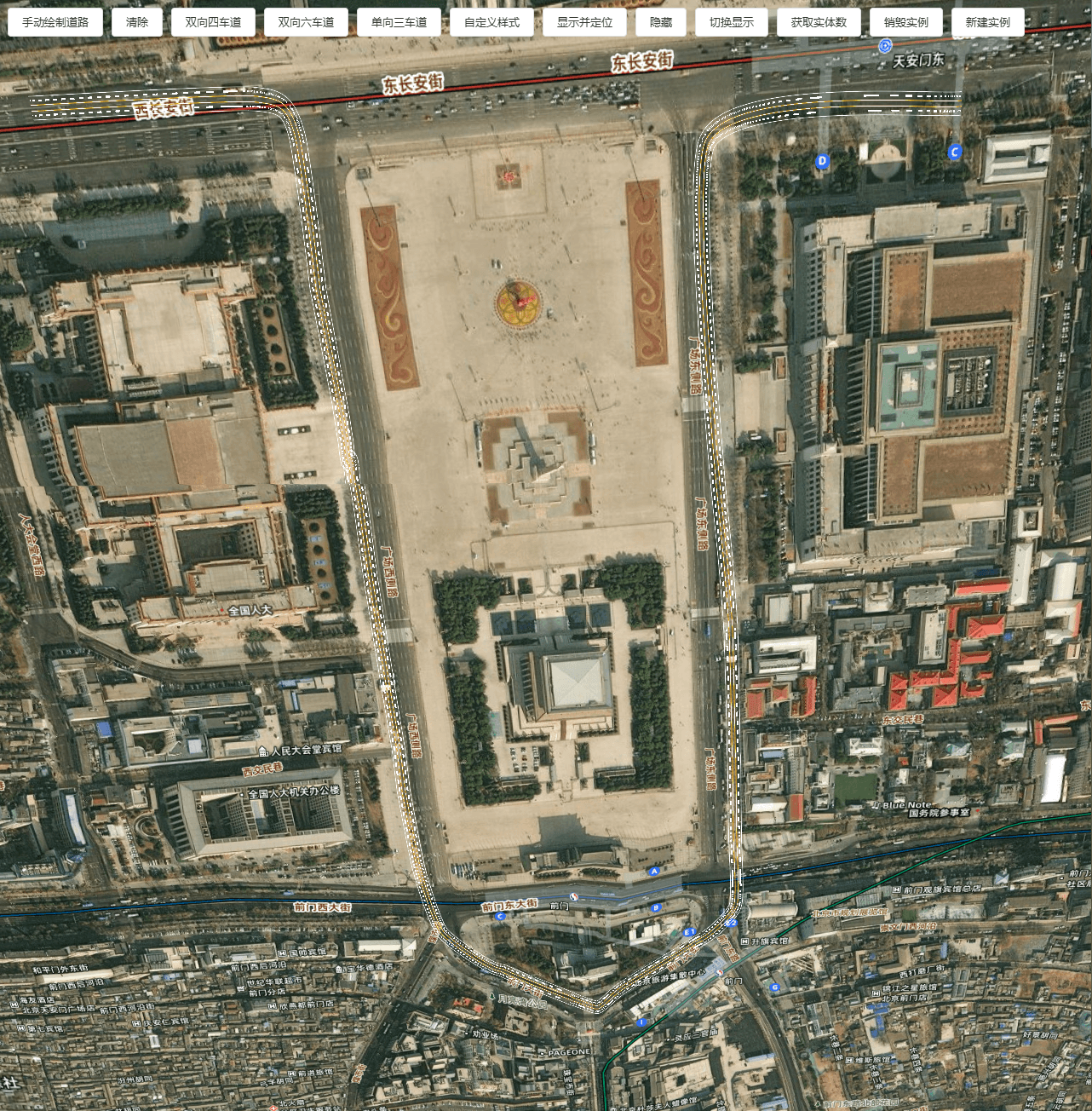
Demo地址:https://mhc.ixiera.com/mhc/mchmap/RoadRenderer/index.html

 返回顶部
返回顶部

 热线电话
热线电话

 微信
微信
 扫一扫
扫一扫