
全球体积云
关键引入文件:
- 第一步:引入框架地图关键文件
- https://mhc.ixiera.com/mhc/main_min.js
- https://mhc.ixiera.com/mhc/Cesium-1.120/Build/Cesium/Cesium.js
- https://mhc.ixiera.com/mhc/Cesium3DTile.js
- 第二步:引入全球体积云API文件
- https://mhc.ixiera.com/mhc/mchmap/volumetricClouds/js/dat.gui.min.js
- https://mhc.ixiera.com/mhc/mchmap/volumetricClouds/js/volumetricClouds.min.js
1.create初始化
const cloudEffect = GlobalCloudsEffect.create(viewer,options);
实例代码:
// 方式1:极简调用(无GUI)【仅2行】
const cloudEffect = GlobalCloudsEffect.create(viewer);
cloudEffect.show(); // 启用云层
// 方式2:带GUI的调用【仅2行】
const cloudEffect = GlobalCloudsEffect.create(viewer, { showGUI: true });
cloudEffect.show(); // 启用云层
2.参数说明:
viewer:创建的view实例。
options: {object} 配置项(非必填)。
options.showGUI:{Boolen}是否显示云层控制器(非必填),默认值false。
options.cloudParams: {object} 云层初始配置项(非必填)。
options.cloudParams云层初始配置项详细说明:
| 属性 | 数据类型 | 默认值 | 说明 |
| windSpeedRatio | Number | 0.0004 | 风速 |
| cloudCover | Number | 0.46 | 云量 |
| cloudBase | Number | 2000 | 云底高度 |
| cloudTop | Number | 4000 | 云顶高度 |
| cloudThickness | Number | 7000 | 云层厚度 |
| maxViewingDistance | Number | 500000.0 | 最大可视距离 |
| cloudColor | Array | [255, 255, 255] | 云颜色 |
| cloudBrightness | Number | 1.0 | 云亮度 |
3.show显示/hide隐藏
显示实例:cloudEffect.show();
隐藏实例:cloudEffect.hide();
4.destroy销毁
实例:cloudEffect.destroy();
5.toggle切换显示状态
实例:cloudEffect.toggle();
6.setCloudParams更新云层配置参数
实例:
cloudEffect.setCloudParams({
cloudCover: 0.1, // 云量
cloudColor: [235, 132, 132], // 云颜色
});
7.getCloudParams获取云层配置参数
实例:
var params = cloudEffect.getCloudParams();
console.log(params);
8.完整代码实例
<xmp>
<style>
body, html { width: 100%; height: 100%; margin: 0; padding: 0; overflow: hidden; }
#cesiumContainer { width: 100vw; height: 100vh; }
.btnsBox{
position: fixed;
top: 10px;
left: 10px;
width: 70%;
height: 30px;
}
.btnsBox button{
background-color: #fff;
border-radius: 2px;
color: #333;
line-height: 30px;
margin-right: 15px;
font-size: 12px;
padding: 0 15px;
cursor: pointer;
}
</style>
<div id="cesiumContainer"></div>
<div class="btnsBox">
<button onclick="getParams()">获取云层配置参数</button>
<button onclick="UpParams()">更新云层配置参数</button>
<button onclick="toToggle()">切换云层显示状态</button>
<button onclick="toHide()">隐藏</button>
<button onclick="toShow()">显示</button>
<button onclick="toDestroy()">销毁</button>
</div>
<script>
// 1. 初始化Cesium Viewer
const view3D = MchCesium.init('cesiumContainer', true);
const viewer = MchCesium.viewer;
// 2. 方式1:极简调用(无GUI)【仅2行】
const cloudEffect = GlobalCloudsEffect.create(viewer);
cloudEffect.show(); // 启用云层
// // 2. 方式2:带GUI的调用(仅3行)
// const cloudEffect = GlobalCloudsEffect.create(viewer, { showGUI: true });
// cloudEffect.show();
// 可选:设置相机视角
viewer.camera.setView({
destination: Cesium.Cartesian3.fromDegrees(116.20, 39.95, 1000.0),
orientation: { heading: 0, pitch: Cesium.Math.toRadians(-10), roll: 0 }
});
// 可选:页面卸载时销毁
window.addEventListener('beforeunload', () => {
cloudEffect.destroy();
});
// 获取云层配置参数
function getParams(){
var params = cloudEffect.getCloudParams();
console.log(params);
}
// 更新云层配置参数
function UpParams(){
// 可选:自定义参数
cloudEffect.setCloudParams({
cloudCover: 0.1, // 云量
cloudColor: [235, 132, 132]
});
}
// 切换云层显示状态
function toToggle(){
cloudEffect.toggle();
}
// 隐藏
function toHide(){
cloudEffect.hide();
}
// 显示
function toShow(){
cloudEffect.show();
}
// 销毁
function toDestroy(){
cloudEffect.destroy();
}
</script>
</xmp>
9.效果展示
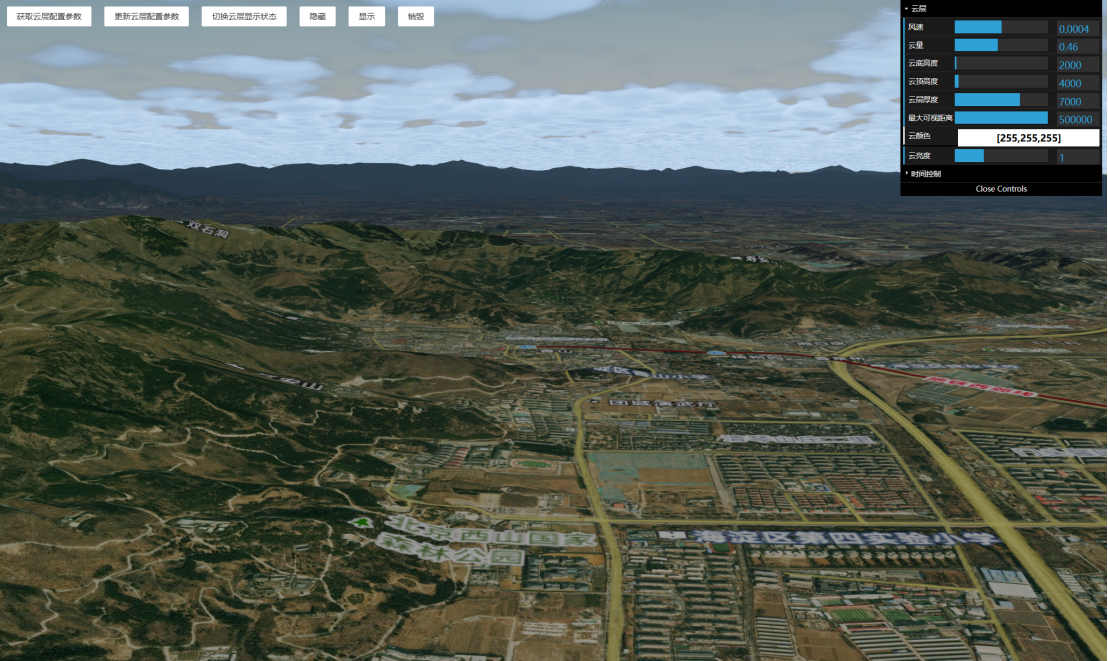
Demo地址:
https://mhc.ixiera.com/mhc/mchmap/volumetricClouds/index.html

 返回顶部
返回顶部

 热线电话
热线电话

 微信
微信
 扫一扫
扫一扫