
加载3DTiles
1.构造方法:
const tilesetMgr = new TilesetManager(viewer);
实例代码:
const tilesetMgr = new TilesetManager(viewer);
tilesetMgr.load(id, url);
2.参数说明:
viewer:Cesium创建的view实例。
id:模型id,唯一标识。
url:模型文件tileset.json路径。
3.load(id, url, options) 加载3DTiles
tilesetMgr.load(id, url,options);
参数说明:
id{string}实例唯一标识
url{string}模型文件tileset.json路径
options{object} 配置项(其中ssError:用于设置驱动细节细化级别的最大屏幕空间误差)
应用实例:
// 方式1: 加载3DTiles(不设置基准点)
tilesetMgr.load("test-model", url, { ssError: 1 }).then(() => {
// 定位到模型
tilesetMgr.flyTo("test-model");
});
// 方式2:加载3DTiles(设置基准点)
tilesetMgr.load("test-model", url).then(() => {
// 设置自定义基准点(经度116.39093087,纬度39.91218836,基准高度150)
tilesetMgr.setReferenceCoordinates("test-model", [116.39093087, 39.91218836, 150]);
// 定位到基准点位置
tilesetMgr.flyTo("test-model");
});
4.setVisible(id, visible) 设置显示/隐藏
// 单个操作
隐藏:tilesetMgr.setVisible(id, false);
显示:tilesetMgr.setVisible(id, true);
参数说明:
id{string}实例唯一标识
visible{Boolean}显示状态:true显示,false隐藏
// 批量操作
隐藏:tilesetMgr.hideAll();
显示:tilesetMgr.showAll();
5.destroy(id) 销毁
// 单个操作
tilesetMgr.destroy(id);
参数说明:
id{string}实例唯一标识
// 批量操作
tilesetMgr.destroyAll();
6.flyTo(id, viewParams = {})聚焦tileset
// 单个操作
tilesetMgr.flyTo(id, viewParams);
参数说明:
id{string}实例唯一标识
viewParams {object} 选填,视角参数(longitude, latitude, height);
// 批量操作
tilesetMgr.flyToAll();
7.changeHeight(id, height)调整高度
tilesetMgr.changeHeight(id, height);
参数说明:
id{string}实例唯一标识
height{Number} 高度
8.setReferenceCoordinates(id, position)设置自定义基准点
tilesetMgr.setReferenceCoordinates(id, position);
参数说明:
Id {string} - 实例唯一标识
position {Array|null} - 基准点坐标[经度,纬度,高度];传null则清除基准点(恢复原始位置)
9.setTranslation(id, x, y, z)设置平移
tilesetMgr.setTranslation(id, x, y, z);
参数说明:
id{string} 实例唯一标识
x {number} - 东向偏移(米,正东为正)
y {number} - 北向偏移(米,正北为正)
z {number} - 高程方向偏移(米,向上为正)
说明:设置平移偏移(基于模型当前位置的ENU坐标偏移,单位:米),每次调用都在模型当前所在位置基础上叠加偏移。
10.setRotation(id, heading, pitch, roll)设置旋转角度
tilesetMgr.setRotation(id, heading, pitch, roll)
参数说明:
id{string} 实例唯一标识
heading {number} - 偏航角(度),绕向上轴旋转(正北为0,顺时针为正)
pitch {number} - 俯仰角(度),绕东向轴旋转(水平为0,向下为正)
roll {number} - 翻滚角(度),绕北向轴旋转(水平为0,右倾为正)
说明:全部为0 → 清除旋转,恢复纯平移矩阵
11.代码实例
<!DOCTYPE html>
<html>
<head>
<meta charset="utf-8">
<title>加载3DTiles模型</title>
<script src="https://mhc.ixiera.com/mhc/main_min.js"></script>
<script src="https://mhc.ixiera.com/mhc/Cesium-1.120/Build/Cesium/Cesium.js"></script>
<script src="https://mhc.ixiera.com/mhc/Cesium3DTile.js"></script>
<style type="text/css">
body{width: 100vw;height: 100vh;display: block;overflow: hidden;position: relative;}
.cesium-viewer,
.cesium-viewer-cesiumWidgetContainer,
.cesium-widget,
.cesium-widget canvas{width: 100%;height: 100%;}
.btns-row{position: absolute; top: 15px;left: 15px;}
.btns-row .item-row{margin-bottom: 10px;}
.btns-row .item-row input{line-height: 30px;padding: 0px 10px;}
.btns-row button{width: 100px;height: 30px; border-radius: 2px;margin-right: 15px;font-size: 12px;}
</style>
</head>
<body>
<div id="container" style="width: 100vw;height: 100vh;display: block;overflow: hidden;"></div>
<div class="btns-row">
<div class="item-row">
<button onclick="render()">加载模型</button>
<button onclick="render2()">加载模型2</button>
<button onclick="setjzPosition()">设置基准点</button>
<button onclick="upHeight()">调整高度</button>
<button onclick="toFFly()">聚焦</button>
<button onclick="toHide()">隐藏</button>
<button onclick="toShow()">显示</button>
<button onclick="toDestroy()">销毁</button>
</div>
<div class="item-row">
<button onclick="toDPosition()">平移方向(东)</button>
<button onclick="toXPosition()">平移方向(西)</button>
<button onclick="toNPosition()">平移方向(南)</button>
<button onclick="toBPosition()">平移方向(北)</button>
</div>
<div class="item-row">
<input type="text" name="heading" placeholder="偏航角(度)" />
<input type="text" name="pitch" placeholder="俯仰角(度)" />
<input type="text" name="roll" placeholder="翻滚角(度)" />
<button onclick="setRotation()">设置旋转</button>
</div>
</div>
<script type="text/javascript">
MchCesium.init('container', true);
const viewer = MchCesium.viewer;
let model_id = 'test'; // 模型id
var url1 = 'https://mhc.ixiera.com/mhc/3dtiles-master/tileset.json';
var url2 = 'https://mhc.ixiera.com/plugins/final_3dtiles/tileset.json';
// 实例化
const tilesetMgr = new TilesetManager(viewer);
// // 方式1: 加载3DTiles(不设置基准点)
// tilesetMgr.load("test-model", url1, { ssError: 1 }).then(() => {
// // 定位到模型
// tilesetMgr.flyTo("test-model");
// });
// // 方式2:加载3DTiles(设置基准点)
// tilesetMgr.load("test-model", url1).then(() => {
// // 设置自定义基准点(经度116.39093087,纬度39.91218836,基准高度150)
// tilesetMgr.setReferenceCoordinates("test-model", [116.39093087, 39.91218836, 150]);
// // 定位到基准点位置
// tilesetMgr.flyTo("test-model");
// });
async function render(){
// 1. 加载模型
await tilesetMgr.load(model_id, url1);
// 2. 调整高度
tilesetMgr.changeHeight(model_id, 83);
// 3. 定位到模型
tilesetMgr.flyTo(model_id);
}
async function render2(){
// 1. 加载模型
await tilesetMgr.load('test2', url2);
// 2. 设置自定义基准点
if(tilesetMgr) tilesetMgr.setReferenceCoordinates('test2', [116.39093087, 39.95218836, 160]);
// 3. 定位到模型
tilesetMgr.flyTo('test2');
}
// 设置自定义基准点 [lon,lat,h]
function setjzPosition(){
if(tilesetMgr) tilesetMgr.setReferenceCoordinates(model_id, [116.39093087, 39.91218836, 150]);
// // 旋转 - 转正模型
// tilesetMgr.setRotation(model_id, 30, 22, 28);
// 聚焦
tilesetMgr.flyTo(model_id);
}
// 调整高度
function upHeight(){
tilesetMgr.changeHeight(model_id, 160);
}
// 平移方向(东)
function toDPosition(){
tilesetMgr.setTranslation(model_id, 50, 0, 0)
}
// 平移方向(西)
function toXPosition(){
tilesetMgr.setTranslation(model_id, -50, 0, 0)
}
// 平移方向(南)
function toNPosition(){
tilesetMgr.setTranslation(model_id, 0, -50, 0)
}
// 平移方向(北)
function toBPosition(){
tilesetMgr.setTranslation(model_id, 0, 50, 0)
}
// 设置旋转
function setRotation(){
let heading = document.querySelector('input[name=heading]').value || 0
let pitch = document.querySelector('input[name=pitch]').value || 0
let roll = document.querySelector('input[name=roll]').value || 0
tilesetMgr.setRotation(model_id, heading, pitch, roll);
// 全部为0 → 清除旋转,恢复纯平移矩阵
}
// 聚焦
function toFFly(){
// // 单个操作
// if(tilesetMgr) tilesetMgr.flyTo(model_id);
// 批量操作
if(tilesetMgr) tilesetMgr.flyToAll()
}
// 隐藏
function toHide(){
// // 单个操作
// if(tilesetMgr) tilesetMgr.setVisible(model_id, false);
// 批量操作
if(tilesetMgr) tilesetMgr.hideAll();
}
// 显示
function toShow(){
// // 单个操作
// if(tilesetMgr) tilesetMgr.setVisible(model_id, true);
// 批量操作
if(tilesetMgr) tilesetMgr.showAll();
}
// 销毁
function toDestroy(){
// // 单个操作
// if(tilesetMgr) tilesetMgr.destroy(model_id);
// 批量操作
if(tilesetMgr) tilesetMgr.destroyAll();
}
</script>
</body>
</html>
10.效果展示:
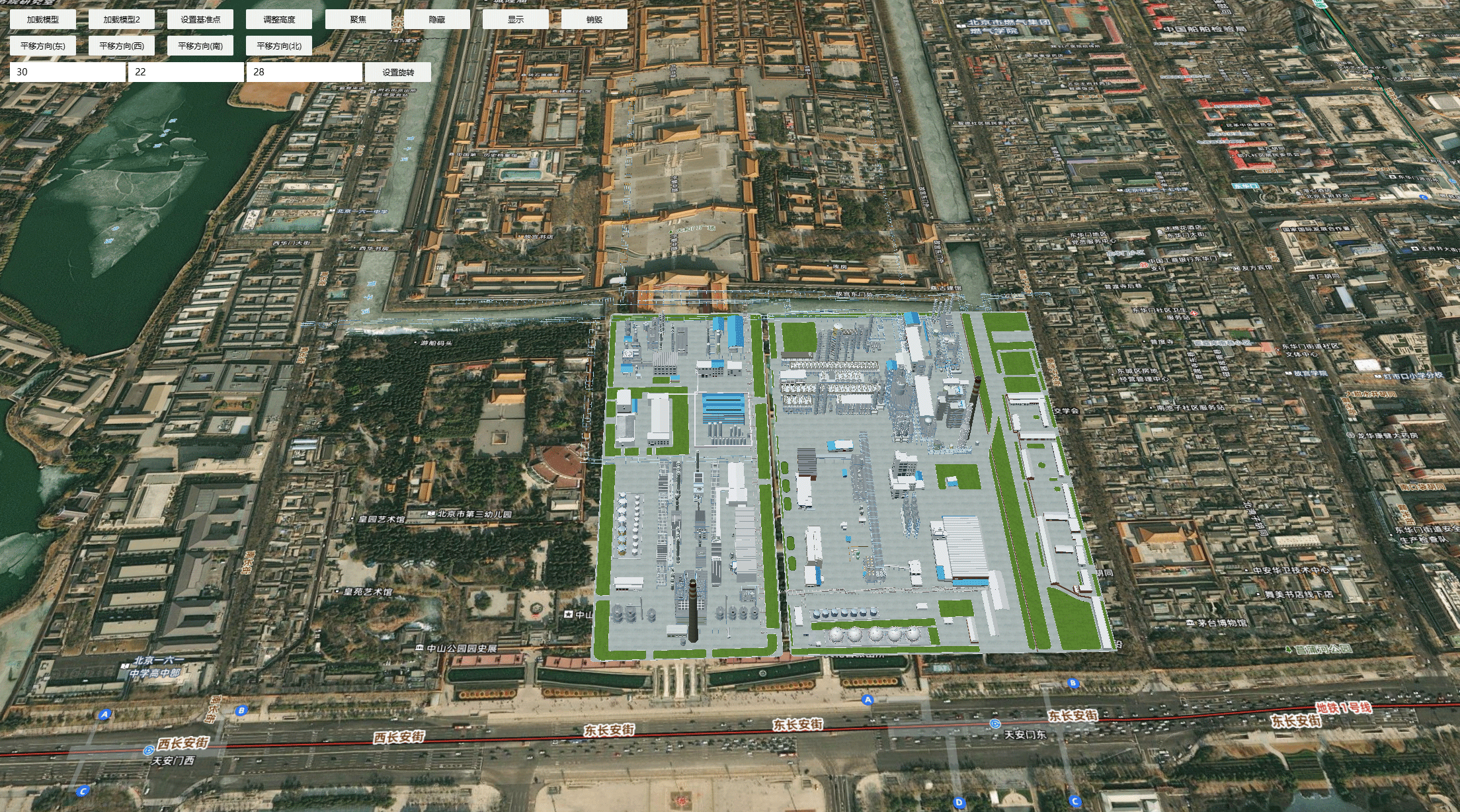
Demo地址:
https://mhc.ixiera.com/mhc/mchmap/demoPages/demo_3DTiles.html

 返回顶部
返回顶部

 热线电话
热线电话

 微信
微信
 扫一扫
扫一扫