
无人机管道
关键引入文件:
- 第一步:引入框架地图关键文件
- https://mhc.ixiera.com/mhc/main_min.js
- https://mhc.ixiera.com/mhc/Cesium-1.120/Build/Cesium/Cesium.js
- https://mhc.ixiera.com/mhc/Cesium3DTile.js
- 第二步:引入无人机管道文件
- https://mhc.ixiera.com/mhc/mchmap/UAVpathTrajectory/js/UAVPathTrajectoryManager.min.js
1.极简-初始化无人机和管道控制器
uavManager = new UAVPathTrajectoryManager(viewer, {
dronecontroller: {
pathPoints: initialPositions,
},
pipeGenerator: {
pathPoints: initialPositions
},
isSmoothedPath: false,
}
2.参数说明:
viewer:创建的view实例。
isSmoothedPath: 是否需要平滑路径,默认值:false;
dronecontroller无人机 param 参数:(如果不传,就不实例无人机)
| 参数 | 数据类型 | 是否必填 | 说明 |
| pathPoints | Array | 必填 | 路径点-飞行路径,长度大于等于2; 默认结构: [{longitude: xxx, latitude: xxx, height: xxx},...] |
| useModel | boolean | 选填 | 无人机是否使用3D模式;默认:true |
| modelPath | string | 选填 | 无人机自定义模型路径;默认:'https://mhc.ixiera.com/mhc/mchmap/UAVpathTrajectory/source/CesiumDrone.glb' 针对useModel:true时有效 |
| imagePath | string | 选填 | 无人机自定义图片路径;默认:'https://mhc.ixiera.com/mhc/mchmap/UAVpathTrajectory/source/icon_uav.png' 针对useModel:false时有效 |
| droneScale | number | 选填 | 无人机缩放大小,默认值:1 |
| aniTime | number | 选填 | 无人机该路程运动时长(单位:秒),默认值:60 |
| isLoop | boolean | 选填 | 是否循环飞行 |
pipeGenerator轨道 param 参数:(如果不传,就不实例轨道)
| 参数 | 数据类型 | 是否必填 | 说明 |
| pathPoints | Array | 必填 | 路径点-飞行路径,长度大于等于2; 默认结构: [{longitude: xxx, latitude: xxx, height: xxx},...] |
| pipeRadius | number | 选填 | 飞行轨迹管道半径 ,默认值:5 |
| materialColor | string | 选填 | 飞行轨迹管道材质颜色,默认值:‘#04e7e433’ |
| materialType | string | 选填 | 材质类型('glow' | 'trail') 默认值:'glow' glow:管道会呈现出一种柔和的发光效果' trail:呈现管道 *选中需引用https://mhc.ixiera.com/mhc/mchmap/UAVpathTrajectory/js/polylineVolumeLightingTrailMaterialProperty.min.js |
3.显示/隐藏无人机+路线
uavManager.toggleDroneVisibility(); //无人机
uavManager.togglePipeVisibility(); //轨道
4.destroy销毁无人机+路线
uavManager.destroy();
5.更新路径
uavManager.updatePipeParams({pipeRadius:80,materialType: 'trail'}); //参数参考上面表格
uavManager.updateDroneParams({aniTime:60,isLoop: false,useModel: false,droneScale: 2, imagePath: './source/icon_uav.png',}); //参数参考上面表格
6.完成代码实例
<script src="https://mhc.ixiera.com/mhc/main.js"></script>
<script src="https://mhc.ixiera.com/mhc/Cesium-1.120/Build/Cesium/Cesium.js"></script>
<script src="https://mhc.ixiera.com/mhc/Cesium3DTile.js"></script>
<script src="https://mhc.ixiera.com/mhc/mchmap/UAVpathTrajectory/js/pathUtils.min.js"></script>
<script src="https://mhc.ixiera.com/mhc/mchmap/UAVpathTrajectory/js/UAVPathTrajectoryManager.min.js"></script>
<style>
html,body,#cesiumContainer { width: 100%;height: 100%;margin: 0;padding: 0;overflow: hidden;}
.btnsBox {position: fixed;top: 10px;left: 10px;width: 70%;height: 30px;}
.btnsBox button {background-color: #fff;border-radius: 2px;color: #333;line-height: 30px;margin-right: 15px;font-size: 12px;padding: 0 15px;cursor: pointer;}
</style>
<body>
<div id="cesiumContainer"></div>
<div class="btnsBox">
<button onclick="toCreate()">初始化无人机+管道</button>
<button onclick="toDestroy()">销毁无人机+管道</button>
<button onclick="toUpdate()">更新参数</button>
<button onclick="toUpdatePath()">更新轨迹-》平滑</button>
<button onclick="toggleVisibility()">显示隐藏管道</button>
<button onclick="toggleDroneVisibility()">显示隐藏无人机</button>
</div>
<script >
// 步骤1、初始化Cesium
const view3D = MchCesium.init('cesiumContainer', true);
const viewer = MchCesium.viewer;
// 步骤2、加载飞行路径
const initialPositions = [
{longitude: 116.57698639239828, latitude: 40.44350820706789, height: 350},
{longitude: 116.58320680517834, latitude: 40.44479157439789, height: 520},
{longitude: 116.59045717108023, latitude: 40.44650471866103, height: 717},
{longitude: 116.5937053223204, latitude: 40.46687213916627, height: 356},
{longitude: 116.60861780306922, latitude: 40.46324631398799, height: 396},
{longitude: 116.6140555010281, latitude: 40.46220665726538, height: 478},
{longitude: 116.6212575410881, latitude: 40.45092817732121, height: 299},
{longitude: 116.62335032128567, latitude: 40.44037501874135, height: 257},
{longitude: 116.62394086232717, latitude: 40.433133068203865, height: 193},
{longitude: 116.62457226126685, latitude: 40.4238096714677, height: 269},
{longitude: 116.62071108955061, latitude: 40.42420769481539, height: 467},
{longitude: 116.61699406933735, latitude: 40.42004691573184, height: 390},
{longitude: 116.61146238156039, latitude: 40.41812121010256, height: 269},
{longitude: 116.60758142674928, latitude: 40.418143300483024, height: 278},
{longitude: 116.60563107800976, latitude: 40.418244152176726, height: 248},
{longitude: 116.60330911218746, latitude: 40.41873325173327, height: 314},
{longitude: 116.59964349716748, latitude: 40.4199524058387, height: 377},
{longitude: 116.59519680136547, latitude: 40.41855415772477, height: 250},
{longitude: 116.59433475696123, latitude: 40.424735576304926, height: 326},
{longitude: 116.58861938295638, latitude: 40.424052048802636, height: 227},
{longitude: 116.5869596683047, latitude: 40.4316354100928, height: 411},
{longitude: 116.58136534810056, latitude: 40.43044293009731, height: 255}]
let uavManager
function toCreate(){
if(uavManager){toDestroy()}
uavManager = new UAVPathTrajectoryManager(viewer, {
dronecontroller: {
pathPoints: initialPositions,
},
pipeGenerator: {
pathPoints: initialPositions
},
isSmoothedPath: false,
});
}
// MchCesium.flyto(116.60, 40.44, 50, function () {
// console.log('flyto');
// })
// 按钮事件绑定
function toUpdate() {
uavManager.updatePipeParams({pipeRadius:80,materialType: 'trail'});
uavManager.updateDroneParams({aniTime:60,isLoop: false,useModel: false,droneScale: 2,
imagePath: './source/icon_uav.png',});
}
function toUpdatePath(){
uavManager.updatePath(initialPositions,true)
}
function toggleVisibility() {
uavManager.togglePipeVisibility();
}
function toggleDroneVisibility() {
uavManager.toggleDroneVisibility();
}
function toDestroy() {
uavManager.destroy();
}
toCreate()
</script>
</body>
7.效果展示
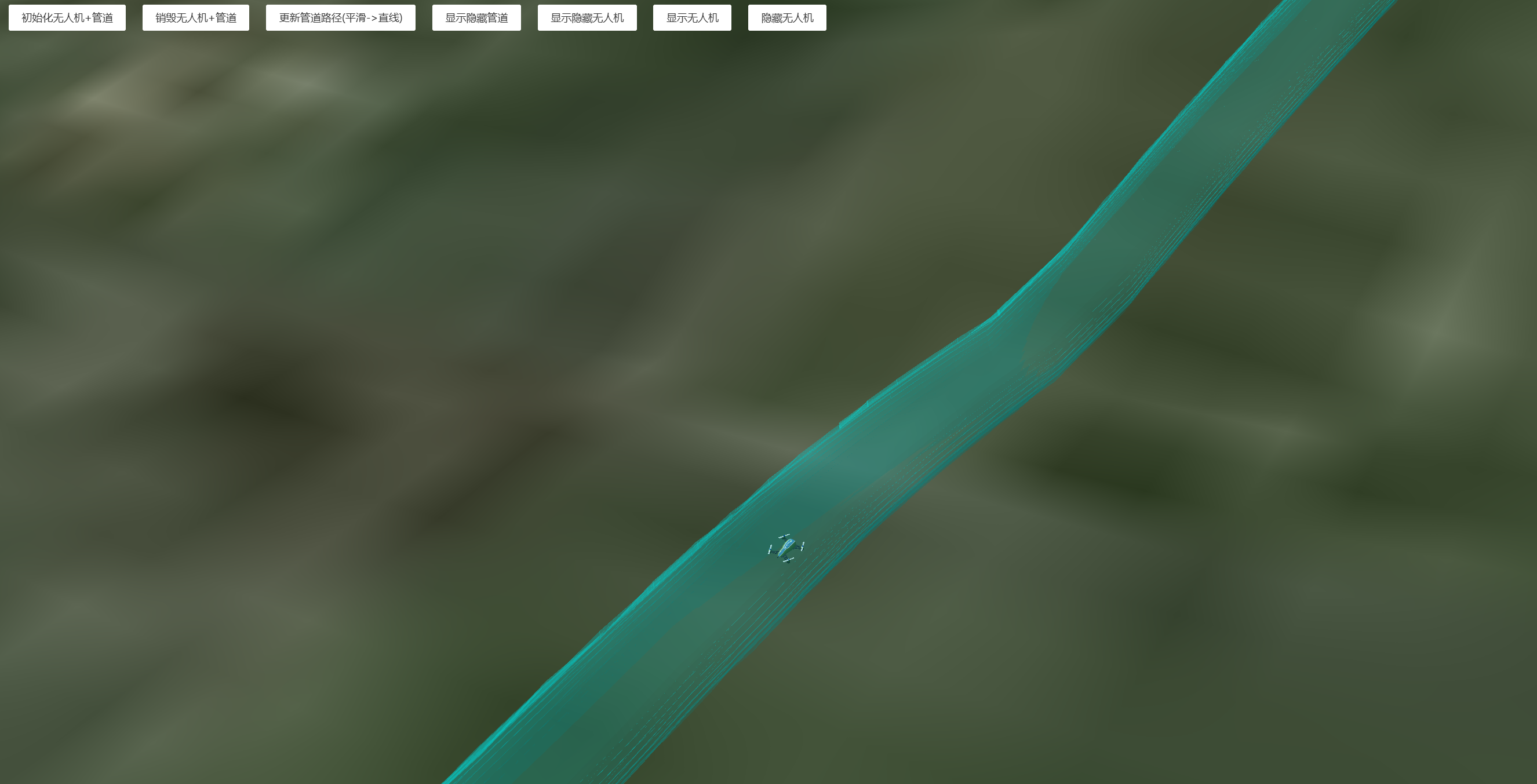
https://mhc.ixiera.com/mhc/mchmap/UAVpathTrajectory/index.html

 返回顶部
返回顶部

 热线电话
热线电话

 微信
微信
 扫一扫
扫一扫